
Client Management Software for Insurance Brokers
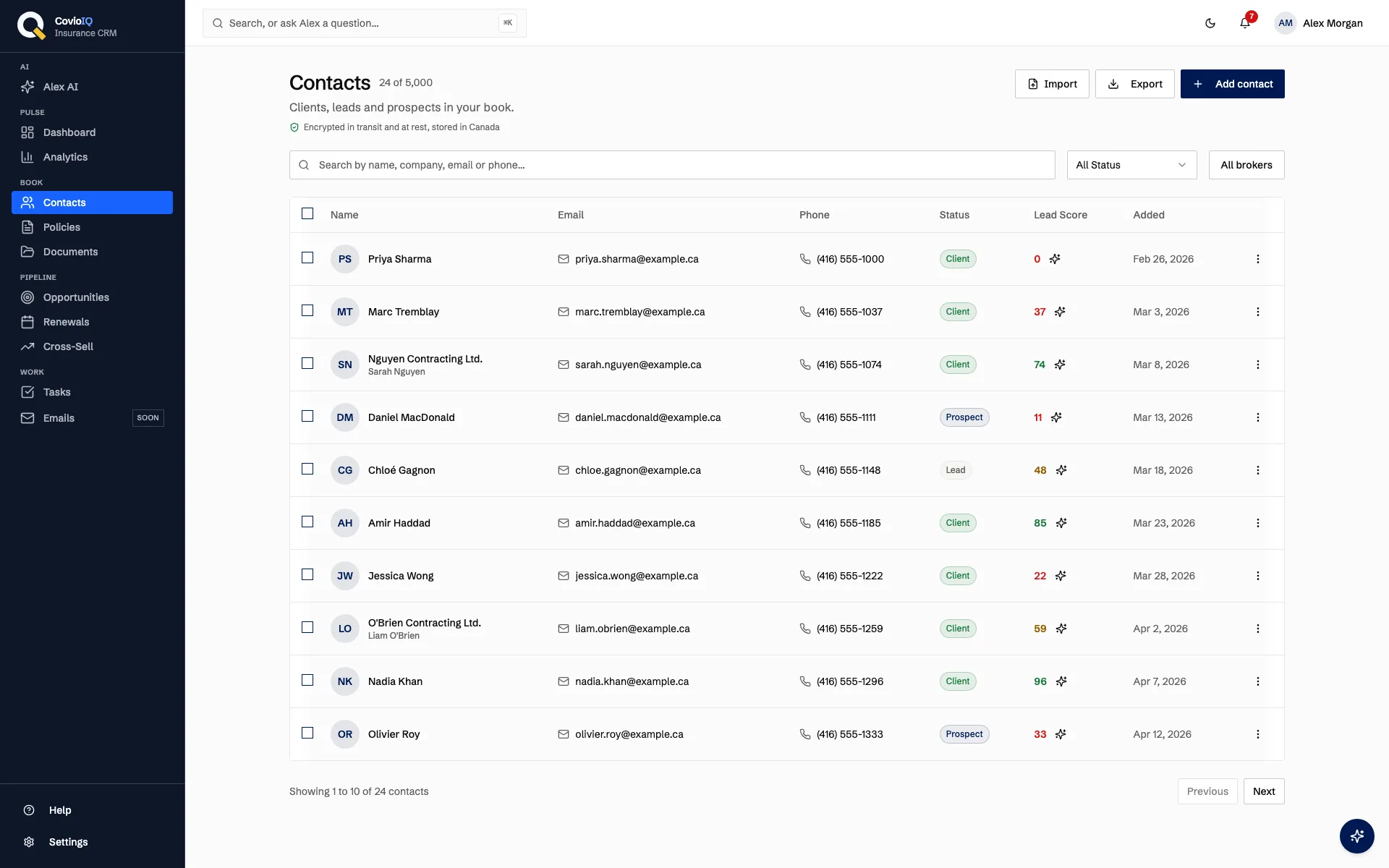
CovioIQ is client management software for Canadian insurance brokers. Each client gets one record with their contact details, status, tags and notes, next to their policies, open opportunities and renewal risk. Bring your list in by CSV, then search, filter and work it from one screen.
Insurance CRM contact management, feature by feature
A Complete Contact Record
Every contact uses the same set of fields, so records stay consistent whether you typed them in or imported them from another system.
- First and last name, email, phone, mobile phone, address and date of birth
- Contact type (individual or business) and company name
- Lead source, so you know where each client came from
Status, Tags and Lead Score
Each contact carries a status that moves from lead to client, plus tags and notes you write yourself.
- Four statuses: lead, prospect, client and inactive
- Tags and free-form notes on every record, added by you
- A rule-based lead score from 0 to 100 on each contact. How lead scoring works
Search, Filters and Bulk Changes
The contacts list is built for finding one client quickly and for tidying many at once. It shows a table on desktop and cards on phones, with pagination for larger books.
- Search by name, company, email or phone
- Filter by status; on team plans, a "My clients" filter and the assigned broker shown on each client
- Select several contacts and change their status in one step
The Client Page
Open a client and the details you need before a call are on one page. Activity is what you and your team log; CovioIQ does not capture calls or emails automatically.
- The client's policies with type, carrier, status, renewal date and premium, plus open opportunities
- A churn-risk card for the next renewal, with the reasons behind it
- Calls, emails, meetings and notes you log, and documents from the Documents section linked to the client
At a Glance
Lead, prospect, client and inactive on every contact
Rule-based lead score range for each contact
Contacts included on the Solo plan
How Brokers Use It Day to Day
Renewal Review Prep
Before a review, open the client page to see their policies and renewal dates, the churn-risk reasons for the next renewal, and the notes you logged last time.
Returning a Client's Call
Search by the caller's name or phone number, open their record, and call back with the click-to-call link. Log the call when you hang up so the next person has the context.
Working Your Leads
Filter the list to leads or prospects, check each lead score, and follow up by email from the record. Update statuses in bulk once a batch has been contacted.
Getting Your Clients In
Export a CSV from whatever you use today, whether that is a spreadsheet, another CRM or a broker management system, and import it into CovioIQ. A check step runs before anything is saved: you map your columns to CovioIQ fields, rows with problems are flagged, and likely duplicates are flagged by email so you can decide what to do with them.
Not on anything yet? Our free client tracking spreadsheet uses these exact columns, so a book kept in it imports without rework.
- CSV import for contacts and for policies, or add records by hand
- Export your contacts to CSV at any time
- Hosted in Canada, with row-level security so each agency sees only its own records
What is not available yet: Gmail and Outlook sync is in development. Connections to broker management systems such as Applied Epic and Vertafore, and to carriers, are planned with no release date. Contacts do not update automatically from other systems today.
Move Your Book Out of Spreadsheets
Import your client list, check it before it saves, and see each client next to their policies.
No credit card required • 14-day trial • Plans from $49/month CAD
Client Management FAQs
What does CovioIQ store for each client?
Each contact record holds first and last name, email, phone, mobile phone, company name, contact type (individual or business), status (lead, prospect, client or inactive), lead source, address, date of birth, tags and notes. Every contact also gets a rule-based lead score from 0 to 100.
Can I import my existing client list?
Yes. Export a CSV from your current system and import it. Before anything is saved, a check step lets you map columns, flags rows with problems and flags likely duplicates by email. You can also import policies by CSV, add contacts by hand, and export your contacts to CSV at any time.
Does CovioIQ sync with Gmail, Outlook, Applied Epic or Vertafore?
Not today. Gmail and Outlook sync is in development. Connections to broker management systems such as Applied Epic and Vertafore, and to carriers, are planned but have no release date. For now, clients come in by CSV import or manual entry.
Are contacts linked to their policies?
Yes. When you create or import a policy you pick or import the client it belongs to. The client page then lists that client's policies with type, carrier, status, renewal date and premium.
Is client data stored in Canada, and who can see it?
CovioIQ is hosted in Canada. Row-level security in the database means each agency sees only its own records. Team accounts use owner, admin and broker roles.
Which plans include client management?
Client management is included on every plan, starting with Solo at $49/month CAD, which covers up to 1,000 contacts. Every plan has a 14-day free trial with no credit card required.