
Insurance Policy Management Software for Canadian Brokers
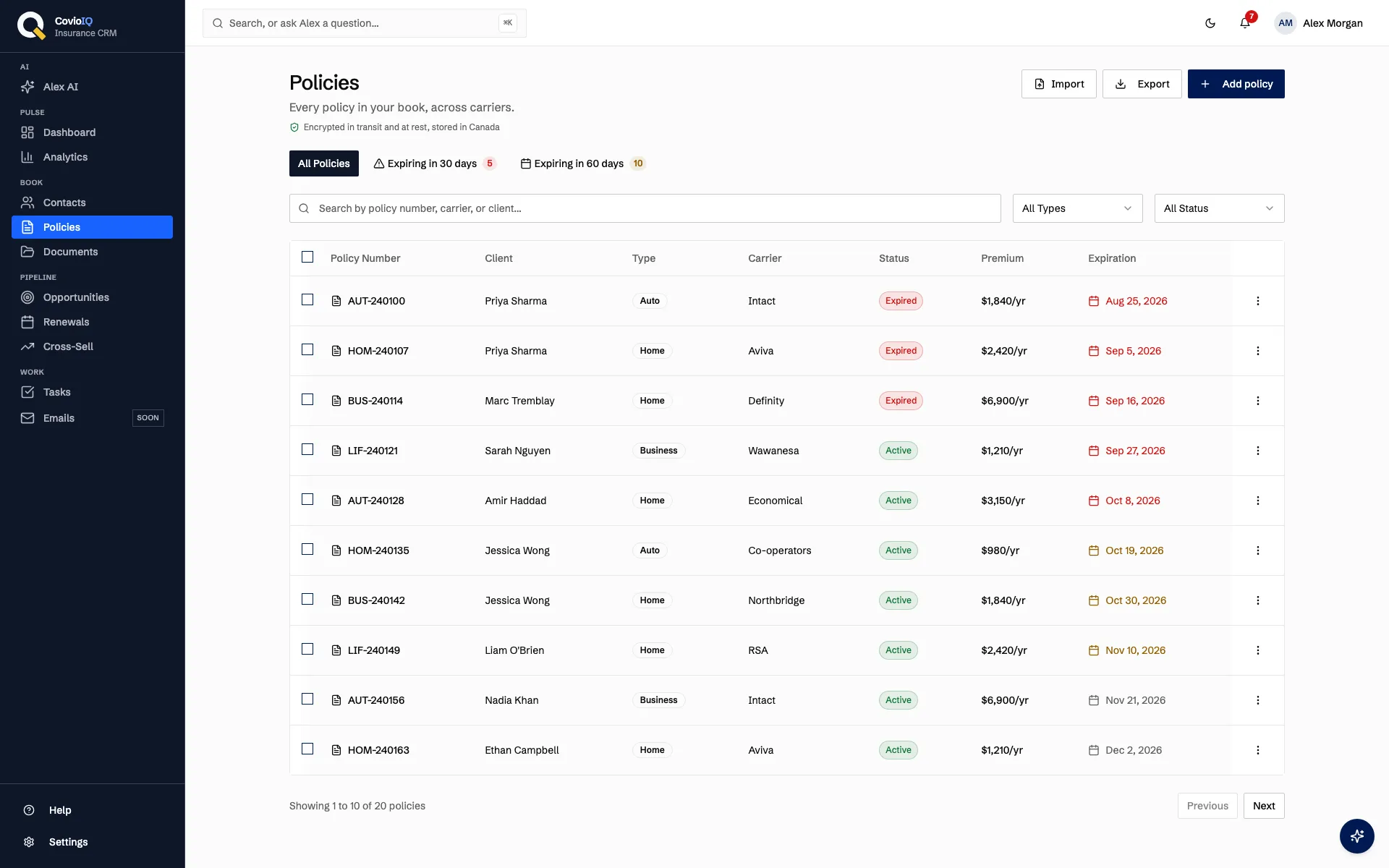
CovioIQ gives insurance brokers one place to track every policy: carrier, premium, commission, coverage and expiration date, each linked to its client. Filter what expires in the next 30 or 60 days, and every active policy moves into your renewal pipeline 90 days before it expires.
Policy Tracking for Insurance Brokers, Without the Spreadsheet
Complete Policy Records
Each policy is a record linked to a client contact, with its policy number, carrier, premium and billing frequency, effective and expiration dates, coverage details and notes. Attach the policy documents in the Documents section so they sit with the client.
- Policy type: auto, home, life, business, health or other
- Status: active, pending, expired or cancelled, and it reflects the expiry date
- Commission rate and commission amount on every policy
Expiry Filters and Renewal Pipeline
The policy list has quick filters for policies expiring in 30 and 60 days, each with a count. Every active policy also enters the renewal pipeline 90 days before its expiration date, with no manual step.
- "Expiring in 30 days" and "Expiring in 60 days" filters with counts
- A churn-risk score from 0 to 100 on each renewal, with the reasons shown
- Optional daily digest email to you: overdue renewals, then the next 30 days
Premium & Commission Tracking
Record the premium with its billing frequency and CovioIQ annualises it wherever policies are compared. Your Dashboard shows total premium and commission for the active book, and the Analytics page breaks it down further.
- Commission rate and dollar amount per policy
- Dashboard totals for premium and commission on active policies
- Commission summary and policies by type on Analytics (Solo Pro and above)
Cross-Sell Gaps from Your Own Book
On Solo Pro and above, cross-sell suggestions use fixed rules, not AI. They flag active clients who hold some lines but not others among auto, home, life, business and health.
- For example, a client with auto coverage but no home policy on file
- Each gap is estimated from the median premium for that line among your own clients of the same kind
- A conservative default is used when fewer than 3 such policies exist. Estimates, not quotes
How Brokers Use Policy Tracking
Weekly Expiry Check
Open the policy list, tap "Expiring in 30 days" and work down the list. Use bulk status change to tidy up cancelled or lapsed policies in one pass. On a phone, the list switches to cards.
Know Your Book
See premium and commission for active policies on the Dashboard, and on Solo Pro and above, review the commission summary and the mix of policies by type on the Analytics page.
At-Risk Renewals
Renewals enter your pipeline 90 days before expiry with a churn-risk score based on premium change, client tenure, policy count and time since last logged contact. The score is an estimate; your judgment decides who to call first.
Policy Tracking: Spreadsheets vs. CovioIQ
| Task | Before (Spreadsheets) | After (CovioIQ) |
|---|---|---|
| Find a policy | Scroll a sheet, check email, call the carrier | Search by policy number, carrier or client |
| See what expires next | Sort by date and hope the column is up to date | 30- and 60-day expiry filters; renewal pipeline from 90 days out |
| Stay on top of renewals | Calendar reminders set by hand, easy to forget | Optional daily digest to you; client outreach stays with you |
| Track commissions | Separate spreadsheet, manual calculation | Rate and amount per policy; totals on the Dashboard |
| Spot missing lines | Manual review of every client | Rule-based cross-sell flags (Solo Pro and above) |
| Move data in and out | Copy and paste between files | CSV import from any system; CSV export of what is on screen |
Put Every Policy in One Place
Import your book from CSV, filter what expires next and see each renewal 90 days out
No credit card required • 14-day trial • Plans from $49/month CAD
Policy Management FAQs
What does CovioIQ store for each policy?
Each policy is its own record linked to a client: policy number, type, carrier, premium and billing frequency, commission rate and amount, effective and expiration dates, status, coverage details and notes. Documents can be attached in the Documents section.
Does it handle both personal and commercial lines?
Yes. Policy types are auto, home, life, business, health and other, so one book can hold personal and commercial clients. You can filter the policy list by type and by status.
Does CovioIQ send renewal reminders to my clients?
No. CovioIQ never emails your clients. Active policies enter the renewal pipeline 90 days before expiry on their own, and you can turn on an optional daily digest email to yourself listing overdue renewals and the next 30 days. The digest is off by default. Client outreach stays with you.
Can I import policies from Applied Epic, TAM, SIG or Power Broker?
Not through a direct connection. Export a CSV from your current system, whichever it is, and import it into CovioIQ. Connections to broker management systems and carrier policy download are planned but have no release date.
Where is policy data stored, and who can see it?
CovioIQ is hosted in Canada. Every record belongs to an agency, and row-level security in the database means each agency sees only its own clients and policies.
Which plans include policy management?
Policy management is included on every plan, starting with Solo at $49/month CAD. The Analytics page and cross-sell suggestions start on Solo Pro. Every plan has a 14-day free trial with no credit card required.