
An Insurance Sales Pipeline for New Business and Cross-Sell
CovioIQ is sales pipeline software for insurance brokers in Canada. Every new-business and cross-sell deal sits in one board, organised by stage, with its value, probability and expected close date, so you can see what is open and what it is worth. Renewals stay in their own pipeline.
What the Insurance Sales Pipeline Tracks
A Board With One Lane per Stage
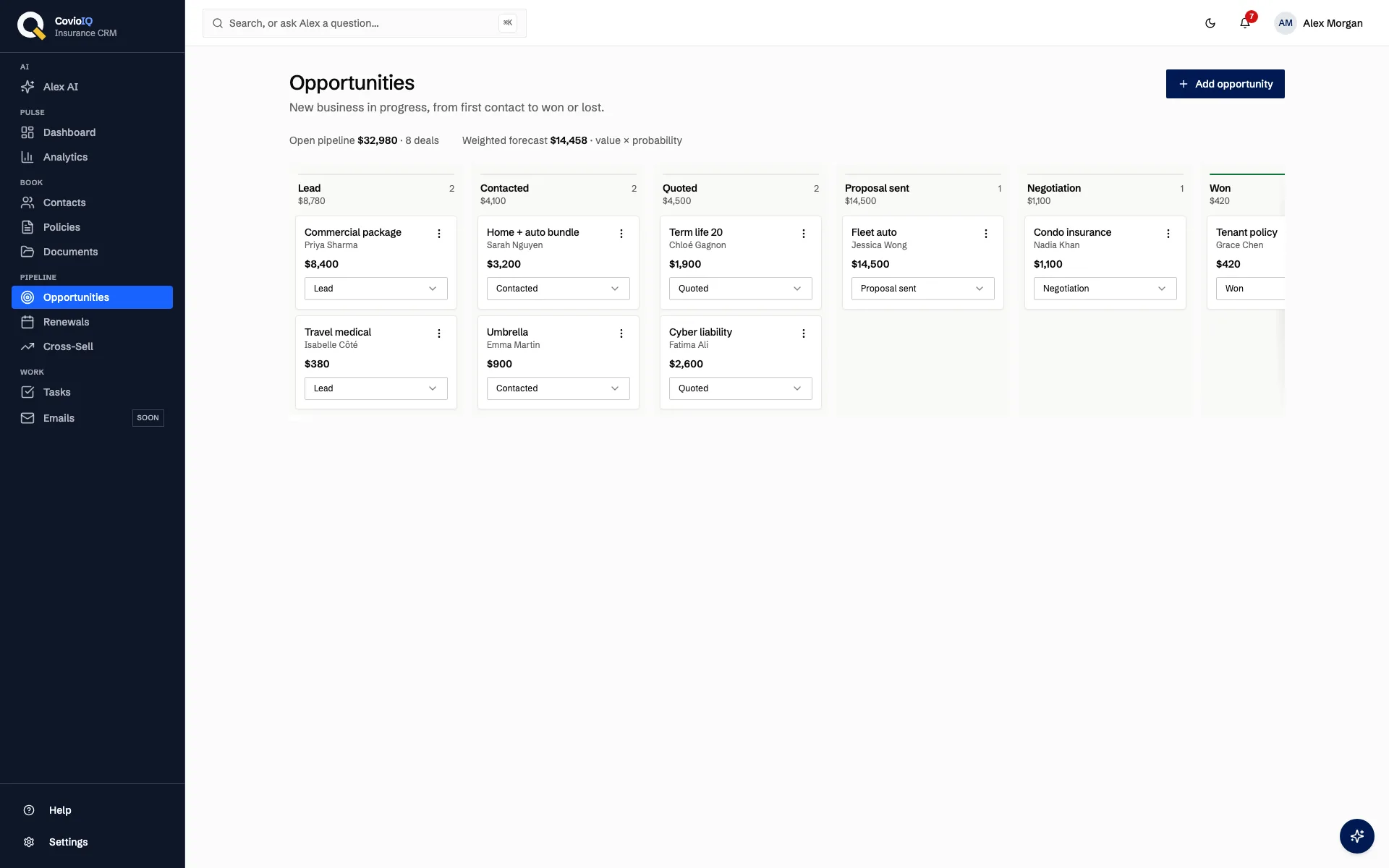
On desktop, the pipeline is a board with seven lanes: Lead, Contacted, Quoted, Proposal sent, Negotiation, Won and Lost. Each lane shows how many deals it holds and their total value.
- Move a deal by changing its stage on the card
- Edit or delete a deal from the card menu
- On a phone, pick a stage and see its deals as a list
Pipeline Total and Weighted Forecast
Above the board, three figures summarise your open deals. They are simple arithmetic on the numbers you enter, so you can check every one of them.
- Open pipeline total: the combined value of all open deals, in CAD
- Number of open deals
- Weighted forecast: value × probability, summed over open deals
Tasks for the Next Call
Follow-up is in your hands. Create a task when a quote goes out or a client asks for time, and it shows up with its due date and priority. Nothing is sent or scheduled on your behalf.
- Each task has a title, due date, priority and linked client
- On team plans, assign a task to another broker
- Turn a dashboard insight, such as a high-risk renewal, into a task in one click
Lead Scores on Every Contact
Separate from the pipeline, each contact carries a rule-based lead score from 1 to 99. It is not an AI model and it does not track email opens. See how lead scoring works.
- Inputs: lead source, contact status and recent logged activity
- Also counts contact details on file and number of policies
- Helps decide which client to call first when several deals are open
How the Opportunities Pipeline Works
An opportunity records the title, client (a linked contact), value in CAD, probability, stage, expected close date, policy type, notes and assigned broker. You update these as the deal progresses; the stages below describe a typical path.
Lead
A prospect or an existing client with a possible new policy. Create the opportunity, link the contact, and enter an estimated value and policy type. Add a task if you plan to call.
Contacted
You have spoken with the client. Record what you learned in the notes, set an expected close date, and adjust the probability to reflect how likely the deal now looks.
Quoted
You have quoted the coverage. Update the value to match the quote, and create a task with a due date so the follow-up call is on your list.
Proposal Sent
The client has a written proposal. Keep notes on the options you presented so anyone on the team can pick up the conversation.
Negotiation
The client is weighing price, coverage or terms. Revise the value, probability and close date as things change, so the weighted forecast stays realistic.
Won
The client has accepted. Move the deal to Won so it leaves the open pipeline figures. Add the new policy to the client record, where you can store its commission rate or amount.
Lost
The deal did not go ahead. Record a lost reason so you can look back at why, and the deal drops out of the open totals.
Who It Is For
Brokers Growing New Business
Keep every open quote and proposal in one place instead of a spreadsheet, with a clear total and a weighted figure based on your own probability estimates.
Brokerage Teams
On team plans, assign each deal to a broker. Team members see agency records according to their role, so managers and producers work from the same pipeline.
Brokers Cross-Selling Their Book
Open an opportunity for an existing client when you spot a gap, such as home coverage for an auto client, and track it separately from that client's renewals.
Tracking Deals: Spreadsheet vs. CovioIQ
| Task | Before (Spreadsheet or Notes) | With CovioIQ |
|---|---|---|
| See where each deal stands | Scroll rows or ask the broker | Board lane per stage with deal count and total value |
| Follow up on a quote | Phone reminder, easy to lose | Task with due date and priority, linked to the client |
| Know what the pipeline is worth | Manual formulas that go stale | Open total, open deal count and weighted forecast above the board |
| Decide who to call first | Gut feel | Rule-based lead score (1–99) on each contact |
Policies store commission rate or amount, and on Solo Pro and above the Analytics page shows a commission summary. Won deals do not create policies automatically.
See Every Open Deal in One Place
A stage-by-stage board, a weighted forecast you can check, and tasks for the next call. Included on every plan from Solo at $49/month CAD.
No credit card required • 14-day trial • Cancel anytime
Opportunities Pipeline FAQs
What is the CovioIQ opportunities pipeline?
It is the sales pipeline for new-business and cross-sell deals. Each opportunity has a client, value in CAD, probability, stage, expected close date, policy type, notes and an assigned broker, and moves through Lead, Contacted, Quoted, Proposal sent, Negotiation, Won or Lost.
How is the weighted forecast calculated?
Above the board, CovioIQ shows the open pipeline total, the number of open deals and a weighted forecast. The weighted forecast is each open deal's value multiplied by its probability, added up. It uses the probabilities you enter; it is not a revenue or cash-flow prediction.
How is this different from the renewal pipeline?
The opportunities pipeline holds new-business and cross-sell deals. Renewals have their own pipeline, and a policy enters it 90 days before its expiry date.
Does CovioIQ send automated follow-up emails for deals?
No. There are no automated email or task sequences. You create tasks with a title, due date, priority and client, and on team plans you can assign them to a colleague. Dashboard insights, such as a high-risk renewal, can be turned into a task with one click.
Which plans include the opportunities pipeline?
Every plan, starting with Solo at $49/month CAD. You can try it with a 14-day free trial, no credit card required.