
Insurance Lead Scoring You Can Explain
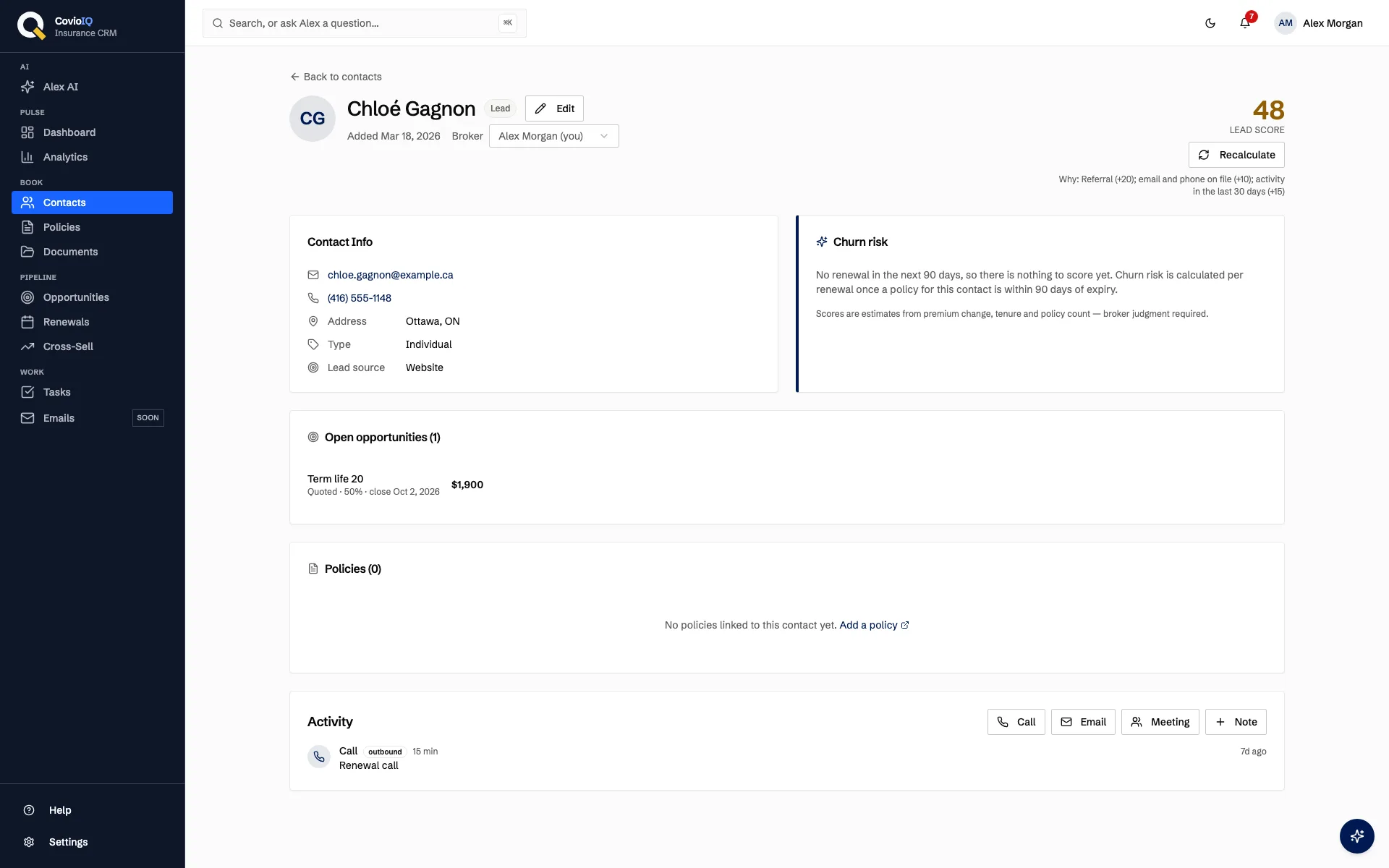
CovioIQ gives Canadian insurance brokers a lead score from 1 to 99 on every contact, built from clear rules about lead source, status, recent activity and contact details. Each score lists the reasons behind it, so you know where to start and why.
How Lead Scoring for Insurance Brokers Works in CovioIQ
A Rule Set, Not a Black Box
Every contact starts at 40 points. Each rule below adds or removes points, and the final score is kept between 1 and 99. There is no machine learning model guessing behind the scenes.
- Lead source: referral, existing client or partner broker referral +20; walk-in +10; website, Google Ads or Facebook +5; cold call or cold outreach −10
- Contact status: already a client +10; prospect +5; marked inactive −20
- Activities logged in the last 30 days: 3 or more +15; 1–2 +8; no activity ever logged −5
- Contact details: email and phone both on file +5; neither on file −10
- Policies: holds 2 or more policies +5
Colour-Coded Scores
In the contacts list, each score is shown in colour so you can scan a page of contacts quickly. Every score also comes with a suggested next step.
"Contact this lead soon while engagement is high."
"Schedule a follow-up and log the outcome."
"Keep in touch periodically; confirm contact details first."
Recalculate When the Record Changes
The score is calculated from what is on the contact record at that moment. When something changes, such as a new call logged or a prospect becoming a client, recalculate the score from the contacts list with the sparkle button next to it.
- Log a third activity this month and the activity rule moves from +8 to +15
- Add an email and phone to a contact that had neither and the contact-details rule moves from −10 to +5
- Mark a contact inactive and the status rule removes 20 points
- Scores do not change on their own from email opens or clicks, which CovioIQ does not track
Reasons You Can Read, Data That Stays Put
Every factor that applied is written out with the score, for example: "Referral lead; 3 activities in the last 30 days; Email and phone on file." You never have to take a number on faith.
- No contact data is sent to an outside AI model to calculate a lead score
- Lead source is a field you set on the contact, or bring in with a CSV import
- The same rules apply to every contact, so scores are consistent across your book
Lead Prioritization: Gut Feel vs. a Written Rule Set
| Scenario | Before (Gut Feel) | With CovioIQ Lead Scoring |
|---|---|---|
| A referral from one of your clients | Prioritized only if you remember the note on the file | Lead source set to referral adds 20 points, and "Referral lead" appears in the reasons |
| A prospect you have spoken to three times this month | Activity is spread across your notes and memory | Three logged activities in 30 days add 15 points once you recalculate |
| A contact with no email or phone on file | You find out when you try to reach them | 10 points removed; if the score lands below 40, the suggested step is to confirm contact details first |
| A cold-call list imported from a CSV | Worked in import order, one row after another | Cold call source removes 10 points, so each one starts 30 points behind an otherwise identical referral |
Who Benefits Most from Lead Scoring
Brokers With a Long Contact List
Hundreds of contacts from referrals, walk-ins and past imports? The colour-coded score gives you a consistent first pass, so you can decide where to start before you pick up the phone.
Brokerage Teams
Every score is calculated from the same written rules, with the reasons attached. That gives the team a shared starting point when deciding who follows up with whom.
Solo Brokers
Limited prospecting time? Start with the green scores, schedule follow-ups for the amber ones, and use the red list to tidy up missing contact details when you have a spare hour.
From Contact Record to Lead Score, Step by Step
Record the Contact
Add the contact manually or import a CSV. Set the lead source (referral, walk-in, website, cold call and so on), the status, email, phone and any policies they hold.
Log Your Activities
Log your interactions as activities on the contact. Activities from the last 30 days count toward the score; a contact with no activity ever logged loses 5 points.
Calculate the Score
Use the sparkle button next to the score in the contacts list. For example, a referral (+20) at prospect stage (+5) with three recent activities (+15) and both email and phone on file (+5) scores 85. A cold-call prospect (−10, +5) with no activity ever logged (−5) and no email or phone (−10) scores 20.
Read the Reasons and Suggested Action
Each factor that applied is listed with the score, along with a suggested next step for its range. If a reason looks wrong, the fix is usually on the record itself, such as an outdated status.
You Decide How to Work the Lead
Scores are guidance, not a verdict. Use them to choose where to start, then apply your own judgment about each client and their coverage needs.
Know Which Leads to Call First, and Why
Lead scoring is included on every plan, starting with Solo at $49/month CAD
No credit card required • 14-day trial • Cancel anytime
Lead Scoring FAQs
What is insurance lead scoring in CovioIQ?
It is a score from 1 to 99 on each contact, calculated from a fixed set of rules: lead source, contact status, activities logged in the last 30 days, whether an email and phone number are on file, and how many policies the contact holds. Every factor that applied is listed next to the score.
Is CovioIQ lead scoring AI or machine learning?
No. It is a transparent rule set, not a predictive model. Every contact starts at 40 and gains or loses points for each rule that applies, so you can see exactly why a lead received the score it did.
Is client data sent to an outside AI model to score leads?
No. Lead scoring does not use an outside AI model, so the contact details behind a score are not sent to a third-party AI service. The rules were written this way to keep client data in Canada.
Does the score change when a lead opens an email or clicks a link?
No. CovioIQ does not track email opens or link clicks. The score reflects what is on the contact record. After you update the record or log an activity, recalculate the score from the contacts list with the sparkle button next to it.
Is a lead score a guarantee the lead will convert?
No. A score is guidance to help you decide where to start. The broker's own judgment decides how to work each lead.
Which plan includes lead scoring?
Lead scoring is included on every plan, starting with Solo at $49/month CAD. You can try it with a 14-day free trial, no credit card required.